3 Retention Quick Wins: Spot Churn Risk Before Your Customers Tell You They're Leaving
3 Retention Quick Wins: Spot Churn Risk Before Your Customers Tell You They're Leaving
Strategic Analysis by: Insight2Strategy
Published: September 14, 2026
Reading Time: 7 minutes
Executive Strategic Insights
- Building a 3-signal churn early warning system catches 60–70% of at-risk accounts before they reach a decision point — using data you already have
- An expansion readiness scan on your top 20 accounts surfaces revenue opportunities inside your existing customer base without any new prospecting
- A 90-day proactive check-in calendar directly addresses the indifference problem that drives 68% of customer churn (Rockefeller Corporation)
- All three quick wins require no new software — total setup time under 6 hours across all three
- A 5% increase in customer retention can lift profits 25–95% (Bain & Company) — a P&L outcome, not just a retention metric
- Churn risk and expansion opportunity live in the same account data — the scan reveals both at once
Most companies don’t lose customers suddenly.
They lose them slowly — and silently.
The cancellation email arrives. The renewal doesn’t happen. Usage quietly drops to zero. And by the time you notice, the decision was made somewhere inside your customer’s organization weeks or months ago.
Here’s what makes this expensive: acquiring a new customer costs 5–7x more than retaining an existing one (Harvard Business Review / Bain & Company, 2014). Every churned account isn’t just lost revenue — it’s the equivalent of 5–7 wasted acquisition budgets. Compounding every quarter you don’t address it.
The harder truth? The warning signals were there 3–6 months before the cancellation. Usage dropped. Support tickets spiked. Your champion stopped responding. The data was sitting in your systems — you just weren’t looking for it in time to act.
These three quick wins change that. They use data you already have, require no new tools, and can be implemented this week.
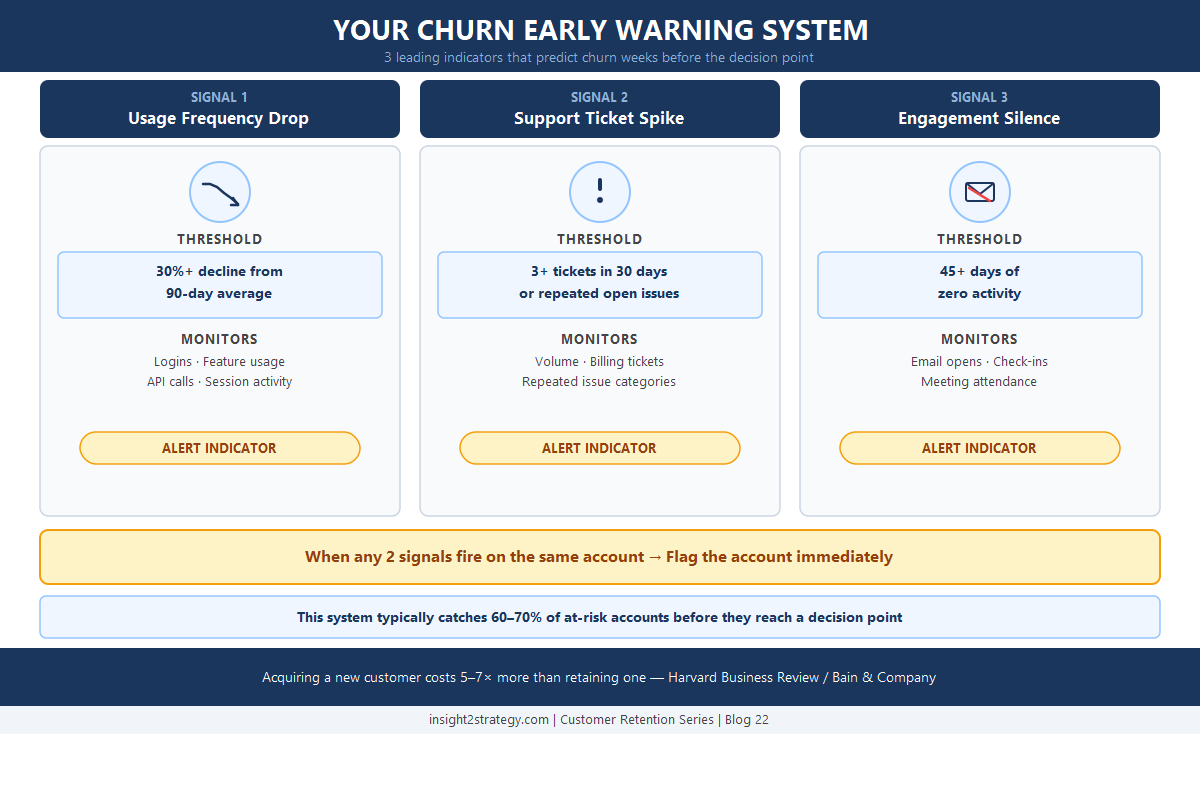
Quick Win 1: Build a 3-Signal Churn Early Warning System
Most churn dashboards only light up after the customer has already decided to leave. By the time the lagging indicators appear — cancellations, non-renewals, escalated complaints — you’re already too late. The fix is switching to leading indicators: behavioral signals that predict churn risk weeks or months before the decision point.
For most recurring revenue businesses, three signals do the heavy lifting:
Signal 1 — Usage Frequency Drop. Logins decrease. Key features go unused. API call volume falls. For most businesses, a drop of 30% or more from a 90-day average is the trigger worth watching. This isn’t a scheduling change — it’s disengagement.
Signal 2 — Support Ticket Spike. Three or more tickets in a 30-day window, or repeated tickets on the same unresolved issue, usually indicates a customer who has hit a friction point they’re not able to resolve. They’re either working to make the product work for them — or they’re building their case for why they shouldn’t renew.
Signal 3 — Engagement Silence. No email opens. No webinar attendance. No response to check-ins. Forty-five or more days of zero activity is a signal, not a coincidence.
⚡ Quick Implementation Tip
Set your thresholds from real data, not guesswork. Pull the last 12 months of activity for 10–20 accounts that churned. Identify what changed 30, 60, and 90 days before they left. That historical pattern gives you calibrated thresholds specific to your business — far more reliable than industry benchmarks. Your churn signature is unique to how your customers use your product.
The alert rule: When any two signals trigger on the same account simultaneously, that’s your flag. One signal alone may be noise. Two signals on the same account at the same time is a pattern.
Implementation time: 2–3 hours to define thresholds, configure a basic alert in your CRM (HubSpot, Salesforce, or a simple Zapier integration), and assign owners.
This single system typically catches 60–70% of at-risk accounts before they reach a decision point. You move from reactive “save” calls — where the customer has already mentally moved on — to proactive “how can we help?” conversations where intervention is still possible.
Because here’s the pattern behind most churn: 68% of customers don’t leave because the product failed or a competitor underbid you. They leave because they feel like you stopped caring (Rockefeller Corporation Customer Attrition Research). The early warning system solves the indifference problem by ensuring someone is paying attention before the customer stops feeling like a priority.
Quick Win 2: Run an Expansion Readiness Scan on Your Top 20 Accounts
Churn prevention and revenue expansion come from the same data. While you’re building your early warning system, run the mirror analysis: which of your existing accounts are ready to spend more?
Existing customers are 50% more likely to try new products and spend 31% more compared to new customers (Invesp, 2024). That growth opportunity is sitting in your current book of business — but most teams only surface it by accident, when a customer happens to ask.
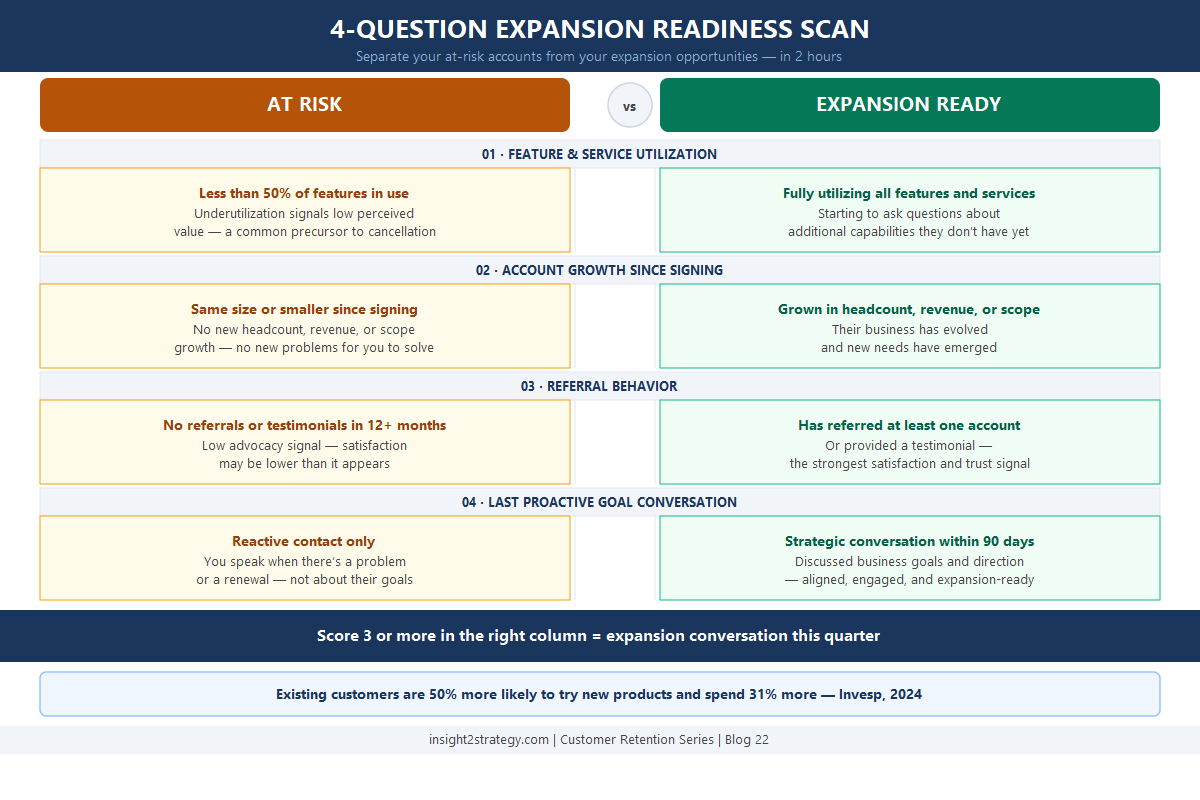
Pull your top 20 accounts by revenue. For each one, answer four questions:
- Are they using everything they’re paying for? Full utilization is a positive signal — they’re getting value. Underutilization is a risk signal and an opportunity: they need better onboarding before they’re ready for more.
- Have they grown since they signed on? Headcount increases, new office locations, revenue milestones, new product lines — growth creates new problems you can solve. If they’ve grown and you haven’t had that conversation, someone else will eventually.
- Have they referred anyone or given a testimonial? Referral behavior is the strongest single signal of genuine satisfaction. Accounts that refer are unlikely to churn. Accounts that haven’t referred in 12+ months — it’s worth understanding why.
- When was the last proactive conversation about their goals? Not a status call. Not a renewal conversation. A real discussion about where their business is heading and whether what you’re providing is still aligned with where they’re going.
📊 Implementation Framework
Accounts that score well on 3 or more questions are expansion-ready. Create a simple spreadsheet with your top 20 accounts and the four questions scored yes/no. The output is a prioritized expansion pipeline and a clear view of which accounts need proactive attention before they drift. This is the same exercise that turns a reactive account team into a proactive one. Need help structuring this for your specific customer base? Let’s discuss your implementation approach.
Companies that excel at customer experience grow revenues 4–8% above their market average (Bain & Company, 2024). The difference isn’t a better sales script. It’s better insight into where your customers actually are.
Implementation time: 2 hours. A spreadsheet, your top 20, and the four questions scored yes/no. The output is a ranked expansion pipeline and a clear view of which accounts need proactive attention before they drift.
Quick Win 3: Create a 90-Day Customer Health Check-In Calendar
The most consistent churn driver isn’t product failure. It isn’t pricing. It’s the perception that you stopped caring.
When your best customers only hear from you during renewal negotiations or when something breaks, the relationship pattern you’re creating is: they matter when there’s a transaction, not otherwise. Over time, that erodes the relationship even for accounts that are technically satisfied with your product.
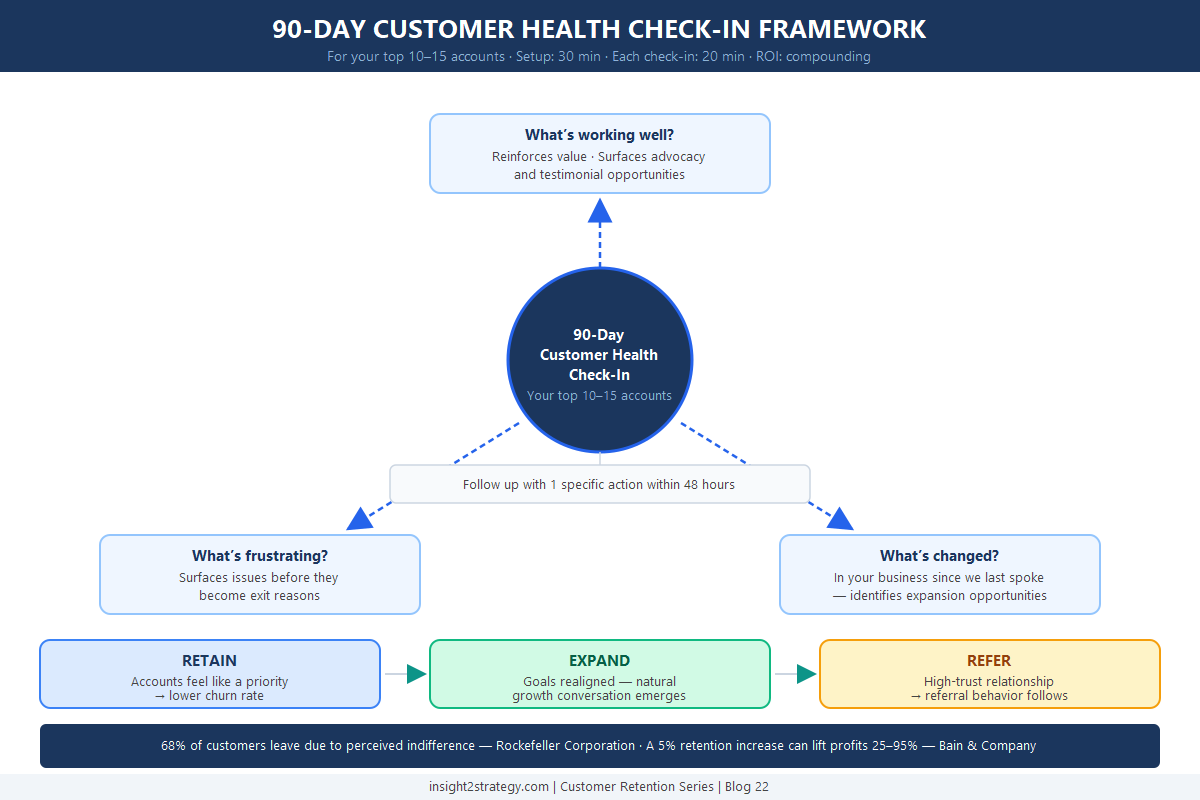
The structural fix is simple: for every top account, schedule a proactive check-in every 90 days. Not a sales call. Not a status update. A genuine “how are things going?” conversation built around three questions:
- What’s working well right now? Let them articulate the value — it reinforces it. It also reminds them why they stay.
- What’s frustrating or slowing you down? Surface the “pebbles in their shoe” before they become exit reasons. Small issues caught early take five minutes to resolve. Unaddressed, they compound into reasons to leave.
- What’s changed in your business since we last talked? This is the question most account teams skip. It’s also where expansion opportunities surface — new hires, new markets, new problems you can solve.
⚡ Quick Implementation Tip
Close every check-in with one specific action item within 48 hours. Not a summarizing email — a concrete next step. This closes the loop and signals that the conversation wasn’t just a courtesy call. It’s the difference between a check-in that builds trust and one that feels like a formality. Even small follow-through compounds into a significant relationship advantage over 3–4 check-in cycles.
Implementation time: 30 minutes to set up recurring calendar blocks for your top 10–15 accounts. 20 minutes per check-in. The cumulative time investment is minimal. The relationship compound effect is substantial.
A 5% increase in customer retention rates can increase profits by 25–95%, depending on your industry (Bain & Company / Harvard Business School). That outcome doesn’t come from better renewal calls. It comes from accounts that feel like a priority for the 11 months before the renewal conversation happens.
What You Now Have
After implementing these three quick wins, you’ll have:
- An early warning system that catches 60–70% of at-risk accounts before they reach a decision point
- An expansion pipeline built from existing relationships rather than net-new prospecting
- A proactive cadence that structurally prevents the indifference problem
None of this requires new software. Total time investment: 5–6 hours. These aren’t temporary fixes — they’re operating habits that compound over time.
Ready to Implement These Retention Strategies?
Start with what’s above. The three quick wins give you a directional churn warning system and expansion signal using data you already have. Run them, see what the data shows, and decide what the patterns are telling you.
No sales pitch. A focused discussion on what your account data is telling you.
If what you find suggests the problem is bigger — consistent churn across certain segments, accounts that never expand despite readiness signals, or patterns you don’t have a systematic way to address — the Retention Audit Express addresses that in 2–3 business days: churn risk tier scoring, expansion-ready customer profiling, and a 90-day playbook with specific actions, owners, and timelines.
And if your churn data suggests the problem is upstream — you’re consistently attracting customers who were never a good fit — the ICP Validation Sprint clarifies which profiles are worth protecting and which are systematically wrong-fit. Sometimes the most effective retention strategy is better targeting at the front end.
|
This post is part of The B2B Marketing Reality Check The strategic framework for growth-stage B2B tech companies — now available in paperback and Kindle. Every topic we cover in this blog goes deeper in the book, with frameworks, diagnostics, and quick wins you can put to work immediately. Get the Free PDF →Want to work through the framework hands-on? Get the companion workbook → |
Frequently Asked Questions
How long does it take to set up a churn early warning system?
The initial setup takes 2–3 hours: pulling historical churn data to calibrate thresholds, configuring alerts in your existing CRM or support platform, and assigning owners to the alert response process. Once set up, the system runs continuously with minimal maintenance — typically a weekly review of flagged accounts.
What data do I need to run the expansion readiness scan?
You need four data points per account: current feature or service utilization, account growth since signing (headcount, revenue, or scope), referral and advocacy history, and the date of your last proactive goal conversation. Most of this is in your CRM. The rest is known by your account team. A 2-hour session with one person who knows your top 20 accounts well is typically sufficient.
How do I know whether my churn problem is a retention issue or an ICP issue?
The pattern tells you. If your churn is concentrated in specific customer segments — particular industries, company sizes, or use cases — that suggests an upstream targeting problem. If churn is distributed across your healthiest segments, that points to a retention operations gap. The expansion readiness scan often surfaces this pattern quickly: if your top 20 accounts by revenue are also your highest-churn accounts, the targeting is worth examining.
What should I do when the 2-signal alert fires?
Reach out within 24–48 hours — not with a save call, but with a genuine check-in. “We noticed you haven’t been as active lately and wanted to make sure everything is working well on your end.” The goal of the first conversation is to understand what’s happening, not to reverse a decision that may not have been made yet. In most cases, early intervention at this stage resolves the issue before it becomes a cancellation consideration.
How often should I run the expansion readiness scan?
The initial scan gives you a baseline. After that, accounts naturally move between states — an at-risk account resolves; a stable account grows and becomes expansion-ready. A quarterly refresh of your top 20–30 accounts, integrated into your 90-day check-in cadence, keeps the scan current without significant overhead.
Insight2Strategy
Helping growing businesses cut through marketing confusion to find strategies that actually drive revenue and customer growth.
Schedule a Free Consultation →
Part of the Customer Retention & Operations Series — Blog 22 of 24


Comments
Post a Comment