4 Marketing Integration Quick Wins: Connect Your Tools Without a 6-Month IT Project
4 Marketing Integration Quick Wins: Connect Your Tools Without a 6-Month IT Project
Strategic Analysis by: Insight2Strategy
Published: August 24, 2026
Executive Reading Time: 8 minutes
Executive Strategic Insights
- The real problem: Disconnected marketing tools destroy revenue visibility — you can't see what's driving pipeline, what's stalling deals, or where attribution is breaking down.
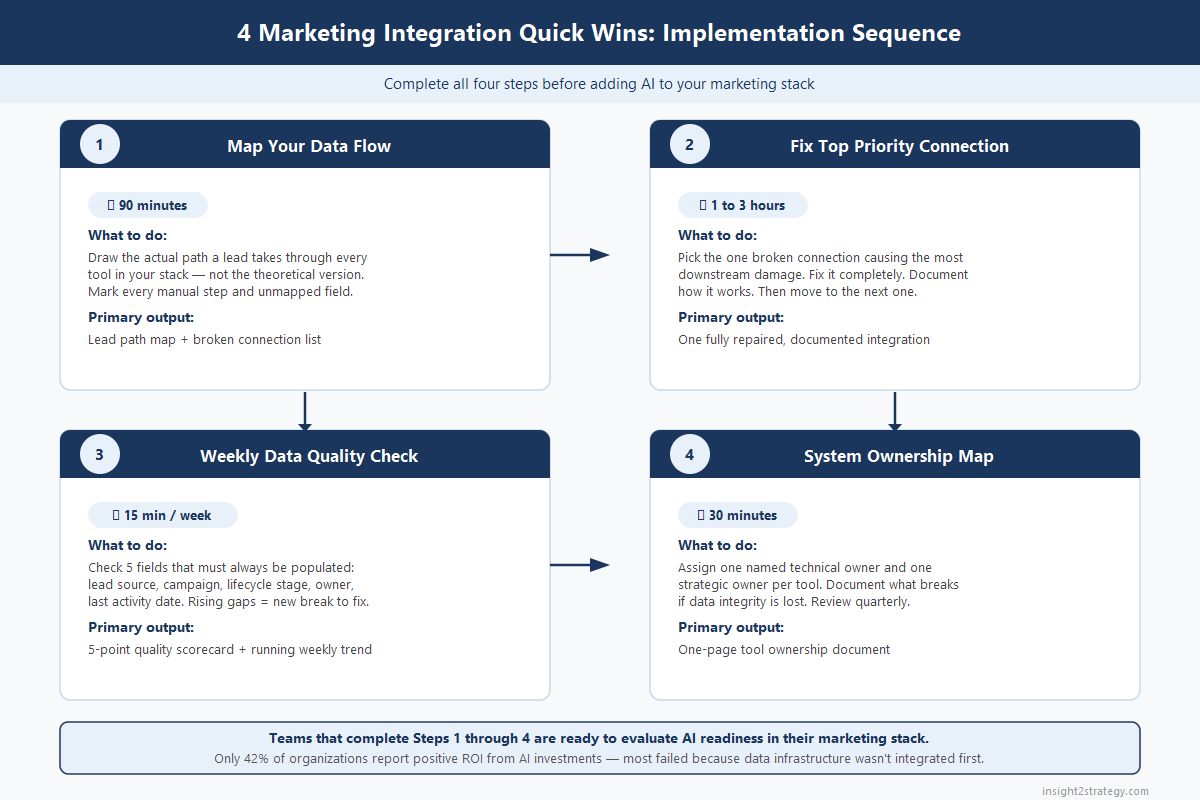
- Quick Win 1: Map your actual data flow in 90 minutes. Most teams uncover three to five broken connections they assumed were working.
- Quick Win 2: Fix the single highest-impact broken connection first — use native integrations (Zapier, Make, HubSpot Ops Hub) before requesting IT work.
- Quick Win 3: A weekly 15-minute data quality check catches integration breaks when they affect dozens of records — not thousands.
- Quick Win 4: One named owner per system prevents more integration failures than any software upgrade.
- The AI dependency: Only 42% of organizations report positive ROI from AI investments — the primary barrier is unintegrated data infrastructure. These four quick wins are the groundwork AI requires. Framework detailed below.
Following along? Get the Marketing Integration Playbook to implement these four quick wins with structured worksheets and templates.
Introduction
You have a CRM, a marketing automation platform, an email tool, a paid ads platform, and probably three or four other tools. They're all holding data about the same buyers. And most of them don't talk to each other.
That's the real problem behind the question we hear most often: "Is our marketing actually working?"
When your systems aren't connected, you don't just lose efficiency — you lose visibility. You can't see what's driving revenue, what's stalling deals, or where your pipeline is breaking down. You're making decisions based on fragmented data, and you're not even sure which fragments to trust.
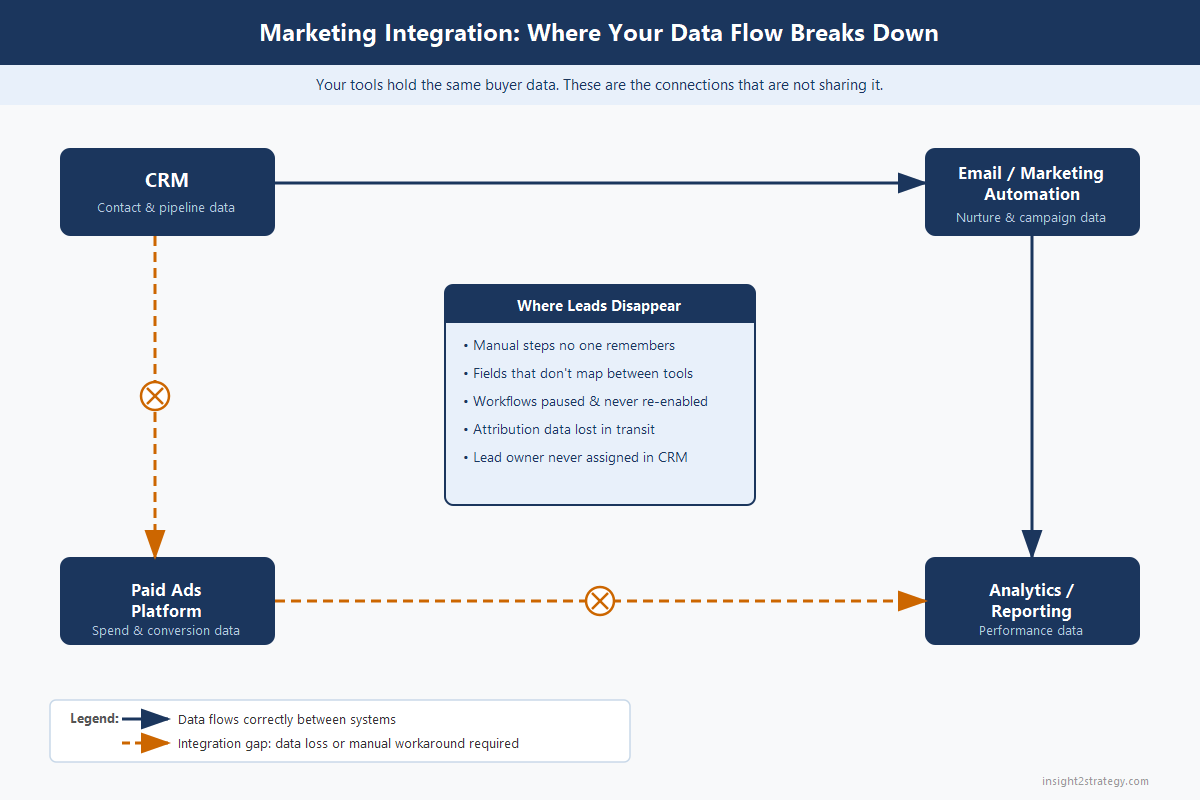
The global marketing automation market was valued at $6.65 billion in 2024 and is projected to reach $15.58 billion by 2030 [Grand View Research, via inBeat Agency, 2025]. Everyone is buying tools. Very few are connecting them.
This "integration debt" is quietly destroying your marketing ROI. But fixing it doesn't require a six-month IT project, a new platform, or a team of data engineers. You can make meaningful progress this week. Here's how.
Quick Win 1: Map Your Data Flow in 90 Minutes
The Problem
Most marketing teams have only a vague idea of how a lead actually moves from first touch to closed deal. They assume the systems are connected. They hope the handoffs are working. But they've never mapped it.
That's how you end up with leads stuck in limbo between platforms, missing fields in your CRM, and campaigns that generate pipeline that mysteriously never converts. You can't fix what you can't see.
The Solution
Map the real path a lead takes through your systems — not the ideal version, the actual version. You're looking for broken connections: manual export steps someone has to remember to do, fields that populate in one system but never transfer to the next, and one-way syncs that look connected but only push data in one direction.
Implementation (90 Minutes, No Code Required)
- Grab a whiteboard, Miro board, or a blank document.
- List every tool in your stack: CRM, marketing automation, email platform, paid ads, analytics, and anything else touching buyer data.
- Map the customer journey: Awareness → Consideration → Decision → Retention.
- For each stage, document exactly which tool touches the lead and what data should transfer forward — email, lead score, lead source, campaign name, lifecycle stage.
- Mark every red arrow: manual CSV exports, syncs that break periodically, fields that exist in one system but not the other.
You're not building a perfect system. You're exposing reality.
Impact
This exercise typically uncovers three to five broken connections that everyone assumed were working. Those breaks are often the direct cause of reporting that doesn't match your pipeline — and of attribution that makes every channel look worse than it is.
⚡ Quick Implementation Tip
Do this exercise with both a marketing person and a sales person in the room. Sales will immediately name the handoff points where data goes missing — they deal with incomplete records every day and have never had a place to formally flag it.
Quick Win 2: Fix Your Highest-Impact Broken Connection First
The Problem
Once you have the map, you'll see multiple issues. Most teams try to fix everything at once — and end up fixing nothing, because a comprehensive integration project gets stalled by budget cycles and IT priorities.
The Solution
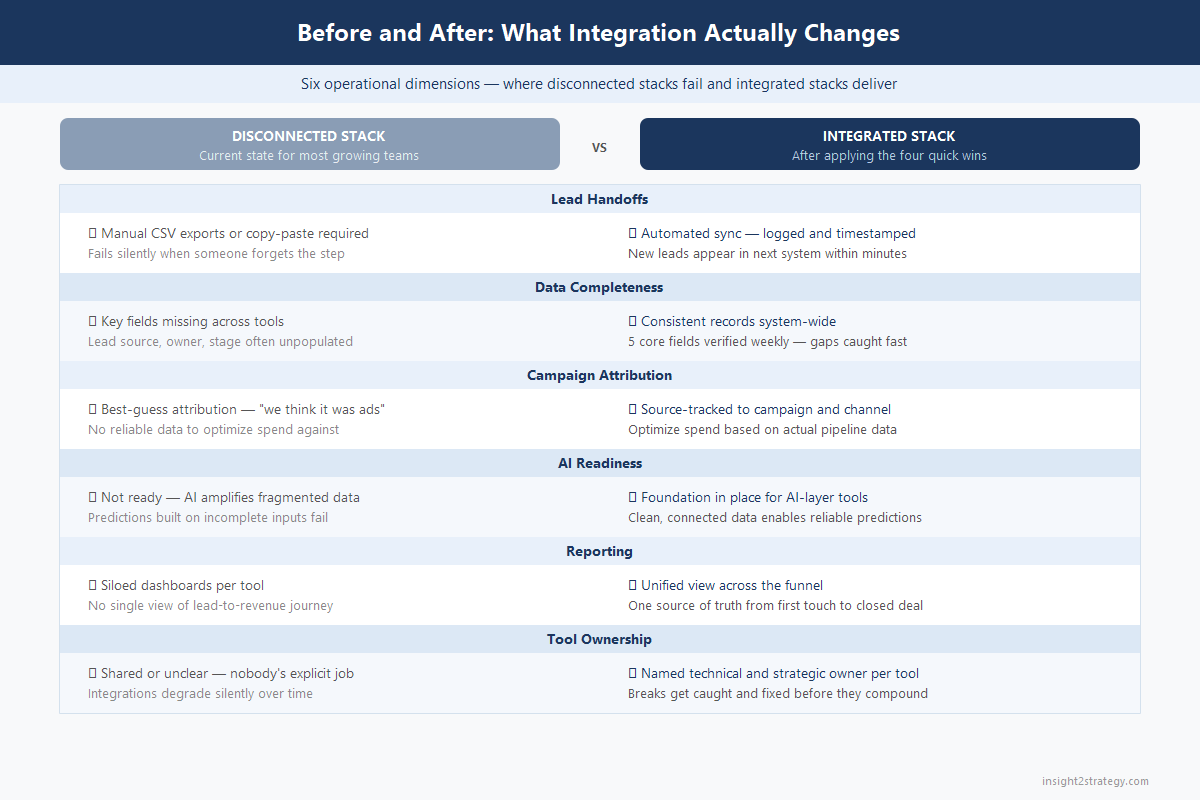
Pick the single broken connection causing the most downstream damage and fix it completely before moving to the next one.
Use this prioritization filter — High Impact = affects revenue visibility or conversion:
- CRM not receiving lead source or campaign data from your ad platform
- Marketing automation not syncing lifecycle stages back to your CRM
- Closed-won data not feeding back into marketing tools (so you keep marketing to customers)
Low Impact = operational inconvenience:
- Minor field naming mismatches
- Duplicate tagging issues
- Reporting inconsistencies that don't affect actual decisions
Implementation
Fix one high-impact connection. Use native integrations or middleware tools first (Zapier, Make, HubSpot Operations Hub) before requesting custom API work — they're faster, cheaper, and don't require an IT queue. Set a clear deliverable: "By Friday, every new lead from our ads platform will sync to the CRM with campaign name, ad set, and lead source populated within 15 minutes."
Test with 50 records. Document how it should work so someone other than the person who built it can maintain it. Then move to the next one.
Impact
Fixing one critical connection unlocks accurate attribution, better lead scoring, and improved sales follow-up. The secondary benefit: a visible win that makes the case for continued integration investment.
📥 Get the Complete Integration Framework
The Marketing Integration Playbook includes the full Integration Priority Matrix, System Ownership Map template, and weekly data quality checklist — structured for immediate use with your team.
Quick Win 3: Build a Weekly Data Quality Check
The Problem
Integration breaks over time — even integrations you built carefully. Tools update their APIs. Someone adds a new form field that doesn't map to anything in the CRM. A workflow gets paused during a campaign rush and never gets re-enabled. Without a regular check, you won't discover these breaks until they've been silently corrupting data for weeks.
The Solution
Create a simple, repeatable weekly data quality check. Not a complex audit — a 15-minute sanity check that tells you whether your core integration chain is functioning.
Implementation
Identify five data points that should always be populated in your highest-priority contact and deal records:
- Lead Source — where did this person come from?
- Campaign Name — which campaign touched them?
- Lifecycle Stage — where are they in the buyer journey?
- Owner/Assignee — whose responsibility is this record?
- Last Activity Date — when was the most recent tracked interaction?
Every week: pull a saved filter view in your CRM that surfaces records missing any of these five fields. If the count of incomplete records is growing week over week, you have a new integration break to investigate.
Assign one person — not IT — as the data steward for the week. Their job is to fix what's broken and flag what caused the gap.
Impact
Teams that check data quality weekly catch problems when they affect dozens of records. Teams that check quarterly catch problems after they've affected thousands — at which point the fix requires a retrospective data cleanup project that takes weeks. This habit also surfaces process failures upstream: if lead source is consistently missing from a specific form, that's a form problem, not a data problem, and it's fixable in five minutes.
⚡ Quick Implementation Tip
Build this check as a saved CRM view and add it to a standing weekly marketing ops calendar slot — even 15 minutes. The discipline is more important than the sophistication of the check. A simple view reviewed consistently beats a complex audit done twice a year.
Quick Win 4: Create a System Ownership Map
The Problem
Most tools don't fail because of technology. They fail because no one owns them. When ownership is unclear, integrations break and stay broken, fields get added without structure, and workflows drift over time. When the person who built a critical sync leaves, that sync becomes fragile — and nobody knows until it stops working.
The Solution
Assign clear ownership for every system in your stack. Not shared ownership. Not "marketing owns this collectively." One person per system, with a backup.
Implementation
Create a one-page ownership table — live in a shared drive or wiki — with these columns for every tool in your stack:
| Column | What It Documents |
|---|---|
| Tool Name | The system |
| Purpose | Why we own this tool |
| Technical Owner | Who handles admin access, API keys, integration setup, and breaks |
| Strategic Owner | Which marketing leader is accountable for ROI from this tool |
| Backup Owner | Who covers when the primary owner is unavailable |
| Last Reviewed | Date someone verified integrations and data quality |
Review it quarterly in your marketing ops meeting. When a new integration is built, the technical owner signs off on the data mapping. When the tool updates, the technical owner tests the integration.
Impact
Systems with clear ownership stay clean, connected, and usable. This single document prevents more integration failures than any software upgrade — because it converts "nobody's job" into "this person's job," with no ambiguity about who's responsible when something breaks.
The Foundation AI Requires
Here's why these four quick wins matter beyond operational efficiency: Only 42% of organizations report positive ROI from AI investments — and the primary reason is consistently the same: AI tools were deployed on top of data infrastructure that wasn't integrated [Kyndryl AI Readiness Report].
Every high-value capability in the expanding marketing automation market — AI-powered segmentation, predictive lead scoring, automated attribution modeling — assumes that your data is connected, clean, and owned. The teams seeing results from marketing AI are not the ones with the most sophisticated tools. They're the ones who did the integration work first.
The four quick wins above are that work. They don't require new software, vendor contracts, or technical resources. They require 90 minutes of honest mapping, one focused fix, a weekly 15-minute habit, and a one-page ownership document.
📊 Want the Complete Framework?
The Marketing Integration Playbook includes structured worksheets for all four quick wins — the Data Flow Map, Integration Priority Matrix, Weekly Data Quality Checklist, and System Ownership Map — formatted for immediate use with your team.
Get the Complete Marketing Integration Playbook
The four quick-win worksheets from this post — data flow map, integration priority matrix, weekly data quality checklist, and system ownership map — in a structured PDF you can use with your team immediately.
Free download. No sales pitch. Just the tools you need to get started.
Download the Marketing Integration Playbook
Get instant access to the Marketing Integration Playbook — enter your email below and we'll send the download link right over.
Want an expert to assess your integration gaps and create a prioritized roadmap?
Schedule a Free Consultation →If you'd rather have an expert assess your integration gaps and create a priority roadmap, our Marketing ROI Diagnostic identifies exactly where disconnected systems are costing you attribution clarity — and what to fix first. And if you're thinking about AI but aren't sure your data infrastructure is ready, the AI Readiness Reality Check scores your current stack so you know what you can connect now versus what needs groundwork first. Both are options — the exercises above cover the core of what you need to get started.

|
This post is part of The B2B Marketing Reality Check The strategic framework for growth-stage B2B tech companies — now available in paperback and Kindle. Every topic we cover in this blog goes deeper in the book, with frameworks, diagnostics, and quick wins you can put to work immediately. Get the Free PDF →Want to work through the framework hands-on? Get the companion workbook → |
Frequently Asked Questions
What is marketing integration debt?
Integration debt is the accumulated gap between how your marketing tools should share data and how they actually do. Every disconnected handoff — a manual export, a one-way sync, a field that doesn't map — is a piece of integration debt. Like technical debt in software, it compounds over time: the longer it goes unaddressed, the more decisions get made on incomplete or inaccurate data.
How do I map my marketing data flow?
Start with a whiteboard or blank document. List every tool in your stack (CRM, marketing automation, email, paid ads, analytics). Then trace a lead's path from first touch to closed deal, documenting which tool touches the lead at each stage, what data should transfer forward, and where the handoff actually breaks. You're looking for manual steps, one-way syncs, and unmapped fields. This exercise typically takes 90 minutes and is best done with someone from both marketing and sales in the room.
Which marketing integration should I fix first?
Prioritize by downstream damage: fix the broken connection that most directly affects revenue visibility or conversion. The highest-impact fixes are usually CRM not receiving lead source or campaign data from your ad platform, marketing automation not syncing lifecycle stages back to the CRM, or closed-won data not returning to marketing tools. Low-impact fixes (field naming mismatches, minor reporting inconsistencies) can wait.
What should I include in a weekly marketing data quality check?
Track five fields across your highest-priority contact and deal records: Lead Source, Campaign Name, Lifecycle Stage, Owner/Assignee, and Last Activity Date. Build a saved CRM filter that surfaces records missing any of these fields. If the count is growing week over week, you have a new integration break to investigate. The goal is catching problems when they affect dozens of records — not thousands.
Do I need integrated marketing systems before using AI tools?
In practice, yes. Only 42% of organizations report positive ROI from AI investments, and the primary differentiator is whether they had connected, clean data infrastructure before deploying AI. AI-powered segmentation, predictive lead scoring, and attribution modeling all assume your data is integrated and accurate. Deploying AI on fragmented data produces fragmented insights. The four quick wins in this post are the foundation AI requires.
How long does it take to implement these four quick wins?
Quick Win 1 (data flow mapping): 90 minutes. Quick Win 2 (fix one connection): 1-3 hours depending on complexity, using native integration tools. Quick Win 3 (weekly data check): 15 minutes per week once the CRM filter is built. Quick Win 4 (system ownership map): 30 minutes to create, plus a quarterly 15-minute review. The full framework can be operational in a single week — without IT involvement for most of it.
Insight2Strategy
Strategic marketing guidance for growing B2B businesses
Helping marketing leaders build the systems and data infrastructure that drive measurable, attributable growth.
Schedule a Free Consultation →© 2026 Insight2Strategy. All rights reserved. | insight2strategy.com


Comments
Post a Comment